
Software switching is cheap and flexible, and running it with a mouse is where a production falls apart. One cursor cannot cut a camera and adjust a fader at the same moment, and the miss is visible to everyone watching.
So you buy hardware to put your hands on. The question is which kind, and the answer depends on what your show actually demands during the busy thirty seconds.
The three kinds of hardware, and what each is for
A button panel for the software you already run
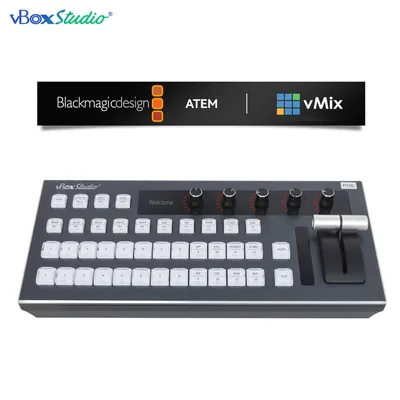
This is a control surface: rows of program and preview buttons, a T-bar or transition buttons, and usually some function keys, connected by USB or network to vMix or ATEM Software Control on your computer. The computer still does the switching. The panel gives you muscle memory.
Buy this when the software is already working, the show is fast, and the only problem is the mouse. The vBoxStudio II at $705.99 is this category, and it does something most panels do not: it speaks both vMix and ATEM, with twelve channels of program and preview on either, plus the ATEM-specific functions (macros, AUX, M/E, super source) laid out as keys.
A joystick controller for the cameras
PTZ cameras framed from a mouse look like PTZ cameras framed from a mouse. A joystick with a zoom rocker and preset buttons is the difference between a move you would broadcast and one you would cut away from.
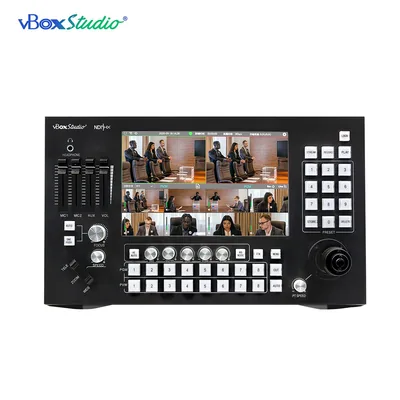
The vBoxStudio-X at $726.99 is a four-axis controller with NDI support, and it sits beside a switcher rather than replacing one.
One box that is the switcher and the camera controller
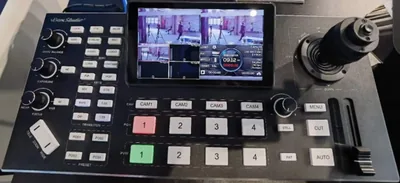
The third option removes the computer. The ViZion SP8 at $3,486.99 takes eight NDI sources, switches them on a 10.1-inch touch screen, controls the pan-tilt-zoom of any of them with a built-in joystick, mixes audio, records, and streams by RTMP.
Buy this when a volunteer team runs the show, or when a laptop in the signal path is a risk you would rather not carry. It is the most expensive of the three and the only one that removes a computer, an operator and two devices from the desk.
Choosing between vMix and ATEM in the first place
If you have not committed yet, the practical differences:
| vMix | Blackmagic ATEM | |
|---|---|---|
| What it is | Software on a Windows PC | Hardware switcher, plus free software control |
| Inputs | Limited by the computer, capture cards and network | Fixed by the model you buy |
| NDI | Native, in the paid editions | Through converters or newer models |
| Graphics and titles | Extensive, built in | Basic on board; heavy work goes elsewhere |
| Risk | Windows updates, drivers, one machine | An appliance that boots when you power it |
| Cost shape | Licence plus a capable PC | One purchase per switcher |
Churches and schools with volunteers tend to be happier with an appliance. Studios that need graphics, replays and lots of sources tend to want vMix. Plenty of productions run both: vMix for the graphics, an ATEM for the clean feed.
The honest recommendation
Software works, you need speed: a control surface. The vBoxStudio II, because it works with either package and you may switch one day.
Cameras are the weak point: a PTZ controller. The vBoxStudio-X, beside whatever you switch on.
You want the computer out of the room: the ViZion SP8, which is switcher, controller, recorder and encoder in one, and which one person can run.
Small budget, two or three cameras: the ViZion SPX, the four-channel version at $1,286.99.
Questions we get asked
Does the vBoxStudio II work with ATEM Mini? It controls ATEM switchers over the network, including the Mini range, with twelve channels of program and preview.
Does it need a computer? The control surface does, because vMix and ATEM Software Control run on one. The ViZion SP8 does not.
Can I control PTZ cameras from vMix directly? Yes, and it works. A joystick is faster and smoother, which matters live and not at all in rehearsal.
What about tally? The SP8 drives NDI tally on each camera. In a vMix or ATEM setup, tally comes from the switcher or a separate tally system.
Firmware and manuals for every vBoxStudio product are on this site. Call 888-400-0607 and describe the show; we will tell you which of the three you actually need.