



A church stream fails for boring reasons. The camera operator did not turn up. The laptop running the software updated on Saturday night. Someone unplugged the audio cable to charge a phone. A setup that survives those weeks has fewer moving parts than most churches are sold, and it can be run by one person from one seat.
Here is what a three-camera NDI setup looks like, what each part does, and what it costs.
Why NDI, in one paragraph
NDI carries video over the network cable you already run for computers. One Cat6 run to each camera carries the picture back, the pan-tilt-zoom commands out, the tally light state, and, with a PoE switch, the power. That is one cable per camera instead of SDI, a control cable and a power supply. For a building where drilling costs money and permission, that difference decides the project.
The three positions worth having
Wide. Back of the room, locked off on the whole platform. This is the shot you cut to when anything goes wrong, so it should never move during a service.
Centre. A medium shot of the pulpit or the person speaking. On a PTZ camera you save this as a preset and recall it, rather than trying to frame live.
Side. An angled shot at 30 to 45 degrees, used for the band, for a reading from the lectern, and for cutting between two speakers. This is the camera that makes a stream look directed rather than recorded.
Three is the number where a stream stops looking like a security feed and before it needs a second operator. Save four or five presets per camera and the operator is choosing between framed shots instead of hunting for them.
The equipment
| What | Why | Price |
|---|---|---|
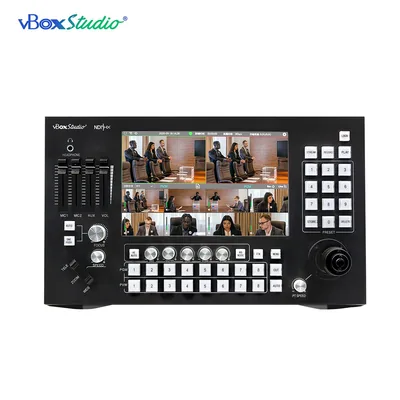
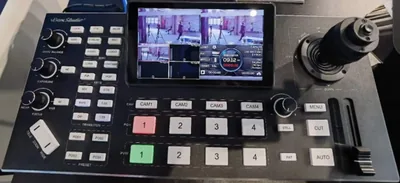
| ViZion SP8 | Eight NDI inputs, PTZ joystick, 10.1-inch touch screen, audio, recording and RTMP streaming in one box. The switcher and the camera controller are the same device, so one person runs both. | $3,486.99 |
| ViZion Z2 × 2 | PTZ NDI cameras, 1080p, 20x optical zoom. Wide and side positions. | $1,145.99 each |
| ViZion D1 | PTZ NDI camera, 1080p60, HDMI, SDI, USB and IP out, optional PoE. Centre position, where the extra frame rate shows on movement. | $1,559.99 |
| PoE network switch, gigabit | Powers and feeds the cameras on one cable each. Buy managed if you can; you will want to keep video traffic on its own VLAN. | Local supply |
| Cat6 to each camera position | One run per camera, back to the switch. | Local supply |
Three cameras and a switcher lands around $7,400 before the network hardware. That is a capital purchase for most churches, so two notes: the SP8 replaces a separate switcher, a separate PTZ controller and a separate streaming encoder, and the system takes a camera at a time. Start with the wide and the centre, add the side when the budget allows.
How it goes together
- Run Cat6 from each camera position to the PoE switch. Keep the runs under 100 metres, which is almost every building.
- Give everything a fixed address. Cameras, switcher and any laptop on the same subnet, with reserved addresses in the router. A camera that changes address between Sundays is the classic Sunday-morning fault.
- Discover the cameras on the SP8. Sources appear on the touch screen by name. Rename them Wide, Centre and Side now, not later.
- Set presets. Frame each shot with the joystick and save it. Wide gets one. Centre gets pulpit, lectern and a two-shot. Side gets band and a wide-of-band.
- Patch audio. Take a feed from the mixing desk into the SP8’s audio input. Do not use camera microphones for anything except a reference.
- Set the stream. Enter your platform’s RTMP server address and stream key in the SP8’s two separate fields, which firmware 1.7.06 split apart for exactly this reason.
- Turn on tally. The SP8 drives the NDI tally light on each camera, so people on the platform can see which one is live.
The Sunday routine
Power the switch, then the cameras, then the SP8. Check each source appears on the touch screen. Recall preset one on every camera. Check the audio meter moves when someone speaks into a microphone. Start the record before the stream, not after, so you have the service even if the internet drops.
Write that on a card and tape it to the desk. The volunteer who covers when your regular operator is away will thank you.
What to check on your internet before you commit
A 1080p stream at 4 to 6 Mbps needs upload headroom, not download. Test the upload speed at the time of the service, not on a Tuesday afternoon, and aim for at least double the bitrate you plan to send. If upload is tight, stream at 720p and record locally at 1080p: nobody watching on a phone will know, and the recording stays sharp for the edit.
Common questions
How many cameras can the SP8 control? Eight inputs, and the joystick controls any PTZ camera among them.
What is NDI|HX? A compressed version of NDI that uses far less network bandwidth, which is what makes it practical over a shared church network. Both ViZion cameras support it.
Do I need a computer? Not for this setup. The SP8 switches, controls, records and streams on its own. A laptop is optional, for slides or a second output.
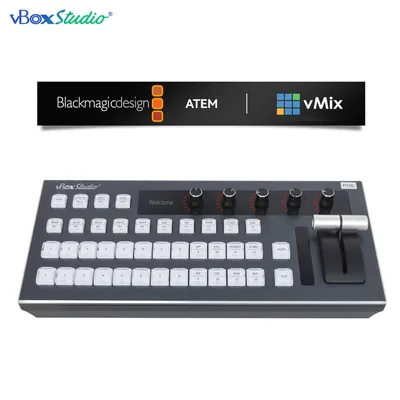
Can I add graphics and lower thirds? The SP8 does overlays. For heavier graphics work, feed the program output into vMix on a computer, or run vMix as the switcher and use a vBoxStudio II control surface instead.
Can we start with two cameras? Yes. The SP8 does not care how many of its eight inputs are used.
Manuals and the current firmware for every vBoxStudio product are on this site. Call 888-400-0607 and we will talk through the room before you order anything.